Thursday, 12 June 2014

FINAL DAY

I've learned a lot in this course, most,or all of it was in Game Maker Studio. At the beginning I started with video editing with after effects and adobe premiere pro, creating a hairshow slideshow (which I still don't know where it is on my computer). It was terrible quality anyway, I think 240p.
Then I moved on to Game Maker Studio, learning the basics and figuring out how to maneuver it. This was when I did the most work, mostly because I love to create games, and it was so easy and customizable with  Game Maker Studio. I tried to create several different types of games, but failed due to it being too difficult and advanced for beginners. A lot of the time I was just messing around with Game Maker and watching random tutorials.
Then I came across a channel called Shaun Spalding I think it was. That channel had a video about how to create a top down zombie shooter game, and that sparked my interest. Though it was an hour long video so I knew it would take a long time to finish, but would be cool to say that it was my game in the end.
I started learning the basics of top down shooters such as pointing the player towards the direction of the mouse, and moving towards it using the arrow or WASD keys. I learned how to make the screen move around with the movements of the player, make zombies follow and hurt the player, make a cool looking open world, blood splatter animations, and so much more from this one video. Even when I was making the platformer at the end, I went back to that video. Overall, I learned a variety of different things this year, from video making to creation of a top down zombie shooter. I will try to take this course next year.

Monday, 9 June 2014

DAY 4

Today I searched up on youtube how to make an advanced platformer tutorial. I found and watched a few videos but they were mainly meant for a really early version of game maker that was alot different from mine, and was hard to transfer to my version of game maker.

Friday, 6 June 2014

DAY 3

Today I decided to go back to my platformer and add in a really annoying block. This block uses the wall sprite and destroys itself when the player touches it so it gets really annoying.

Thursday, 5 June 2014

DAY 2

Today I added really cool backgrounds for extra added effect towards the game. I then decided that the game was done because I couldn't find anything else I could add to it. So I went back to find my old top down zombie shooter and managed to actually find it hidden through a bunch of files. I then created another room for it, so that I could make an abandoned town kind of thing. I figured out that I could make a background for the room before I made it, and it automatically fills in everything with that background, which could have saved 30 minutes from when I was making the first room a while ago. I searched the internet to find textures of buildings and stuff, and found some pretty cool textures. I then added them into the game, and made it so when the player goes to the far right corner of the first room, there is a trail that will lead to the abandoned town.

Tuesday, 3 June 2014

MONTH 5: DAY 1

Today I increased the difficulty of each level by making the jumps further to reach. I also made a new object that gets destroyed when the player touches it, acting as a block to mess up the player. I haven't added it anywhere yet as I dont know where to put it.

Friday, 30 May 2014

DAY 16

I began the class with having to unlock the door in which our laptops are stored. We made a contraption to hang over the wall and hook the door open, though the teacher got the key in the middle of it. I then started making my game harder. I created another sprite acting as an enemy. It roams around left to right and when the player touches it, it restarts the level. It took a few people many tries to beat it after that, and one person gave up.

Thursday, 29 May 2014

DAY 15

I continued making the depth of my platformer better, and also added another level. I was planning on adding a bunch of other levels, but when I reached 5 rooms, It said that is the maximum rooms I can have in a game. So I then began making the levels harder and replaced the 5th level with an end screen instead of a level. Next class I am going to see if I can post my game on blogger and play it through there.

Wednesday, 28 May 2014

DAY 14

I watched a video on how to make a room switch to another room, and figured out the code on how to do it. I then started making a point object which I later made so that when the player touches it, it switched the level. That will be my main "room-switcher" thing. I then created multiple levels, and played them through a various amount of times. I ended up making about 6 levels so far, and am going to create a bunch more.

Monday, 26 May 2014

DAY 13

Today I watched some more videos on game maker studio and platformer games. I added a text sign in my game that says press r to restart, to restart the level. This sign was extremely terrible quality and I couldn''t figure out why. I re-made the sign in paint and exported it to game maker but it still was bad quality. So I decided to just leave it off for a while and come back to it while I added some different aspects to the game.

Thursday, 22 May 2014

DAY 12

Today I re-textured the ground blocks from black to an outline around it. I watched a different video that showed me how to create power-ups in the game. I made it so that when I touched the power-up, it made the player sprite turn purple (same colour as power-up) and make the gravity lower, which makes the player jump higher and float longer, but only for a few seconds. The power-up also disappears when the player touches it. The video is HERE

Wednesday, 21 May 2014

DAY 11

Today I finished the video I was previously watching last class, and moved on to this one HERE.
There are a whole bunch of videos by Shaun Spalding all about game maker studio platformer game making and things. I am going to watch a few of them and make my game revolving around all of them. I created more realistic gravity mechanics for the object player, and also re-created the sprite to make it a more simple kind of game. I attempted to make the camera follow the player object as it moved through the level, but the screen only moved when the player moved up against the edge of the window, making it unable to see in front of the object.

Tuesday, 20 May 2014

DAY 10

Today I focused mainly on the creation of my main sprite, as I want it to be original and also look good at the same time. My character was glitching out then I realized it wasn't completely centered. I then added extra controls such as when you press "R" it resets the level if you messed up. I am going to try to make a bunch of different levels, and It should be quite easy. I continued watching this video HERE

Friday, 16 May 2014

DAY 9

Today I found a very helpful video that I am going to be following along with for the next few classes. The link to the video is HERE. I began creating the engine for the game when my computer blue screened, and I had to restart it which took like 10 minutes for some reason. I then began restarting on the engine of the game and finished it. Then I started to create a sprite within Game Maker.

Thursday, 15 May 2014

DAY 8

Today I decided that I am done with the zombie survival game for now. I might continue it on later, but im not really sure what else to add to it. So I started looking for a good tutorial video for game maker studio on how to make an RPG game. I created a player sprite first, and added some movement to it. I went to run it, and it was very buggy, so I did it by code. I then launched it and there was atleast 4 errors, it was at this point when I exited it but completely forgot to save anything so I went back to look for a tutorial.

Wednesday, 14 May 2014

DAY 7

Today I increased the size of the room (forest) by 500 pixels wide. I want to mould this game into a game where you have to collect loot (ex. guns,health,etc.) in order to survive the longest. But I found that when I increase the room size, it glitches with the tiles and it's hard to explain. So I had to manually fill in the whole thing with tiny tiles, and a huge amount of trees and bushes. I added a small pathway that will be leading to an urban area of some sort, maybe houses or stores. Below is a picture of the forest so far:

Tuesday, 13 May 2014

DAY 6

Today I searched throughout google for sprite sheets, or sprite for the environment such as spilled garbage or dead zombies and what not. I gave up after thinking about starting a pause menu and start screen. I then began searching youtube for a decent tutorial. I then decided to use what I've learned from the previous tutorials and figure out a way to show a message and also pause the game at the same time. So i put in a piece of code for the keyboard escape press event: show_message("Paused, press escape to continue")
I didn't think it would be that easy but it was.

Friday, 9 May 2014

DAY 5

Today I actually figured out how to make the trees in the environment make a sort of 3D effect, which is really cool. Basically, the top half of the tree rotates according to the movements of the player, creating a 3D effect. I also custom painted blood splats and pools, and placed them randomly. This makes the area look a lot more deserted, and like everyone died in the apocalypse. I tried to take a screenshot while shooting the gun at the zombies, but it didn't work, though here is a screenshot of a part of the map:

Thursday, 8 May 2014

DAY 4

Today I searched up some tile sets on google images and found a cool cartoon looking one. Basically tile sets are multiple sprites in one set. I also made the world about 3 times bigger, this took about 30 mins because I had to place each tile singularly, besides using shift it was very tedious. I made the world alot more custom to what I like also. Below is a a screenshot of a part of the world:

Wednesday, 7 May 2014

DAY 3

Today I realized that when my health bar goes all the way down, nothing happens and the player can keep on playing the game, which defeats the purpose of the game which is to survive the longest, and get to the highest level. So I basically spent all class trying to find a video that showed me how to do it but then used the stuff I learned in the video to do it. I just issued a command in the health bar draw event that stops the game whenever the hitpoints are equal to 0.

Tuesday, 6 May 2014

DAY 2

Today I created a random spawning system for the trees and made it so that they also do not spawn on top of the player. I then made a zombie spawning system and made it so that they spawn more zombies as time goes by. After that, I created a health bar so when a zombie touches the player, the health bar decreases. As time goes on there is levels and it gets harder the more you play. I finally finished the video today , but I am still going to add on to the game much more, like create a whole map.

Monday, 5 May 2014

MONTH 4: DAY 1

I attempted to create a sort of 3D moving tree with the video, but it didn't work because he said that I had to watch his other video to be able to do it, and I wanted to focus on the game so I skipped that part. I then created a tree line surrounding the outside of the room to have a trapped in the woods kind of feel to the game. I then also added a light that follows the character that glows up the area the player is in. This is the video I used HERE, and I got 49.51 mins through.

Wednesday, 30 April 2014

DAY 16

Today I continued my top down zombie shooter game with THIS video. By following along that video, I added a background and sort of a scene. I made it so that there is a sort of mist flowing through the world infinitely, and also made it so the camera follows along with the movements of the player within the game. I added another object acting as the zombies, and made it follow the player constantly. Then I pasted in some code that actually added a particle of a blood splat. Then I centered it onto the zombie whenever the object bullet hits it, and it takes about 2 hits for it to dissappear or die. I coded it so the bullet doesn't just go in one direction the whole time, and made it so it shoots randomly. Then I made the gun a shotgun by adding two other bullets. Finally, I am starting to make 3D trees within the environment. I made it 36.13 mins through the video today.

Tuesday, 29 April 2014

DAY 15

Today I finished off with the sort of test game with the video I was following along. Unfortunately the video was only ten minutes long, and it only showed me how to do the really simple parts of a top-down-shooter. Anyway, the things I finished off were the W,A,S,D controls of the character that go along with the mouse rotation. I also created a zombie character to act as an enemy. I made it so that when the bullet object hits the zombie sprite, it dissappears. Then I made it so that it takes a few bullets to do so. That was when the video ended off. So I then decided to either improve upon my game, or create a whole different, and better game. It was at that point when I found a video that showed a more difficulty way to create a zombie shooter. This video is one hour long but I am willing to go along with it. At this point I am 11.49 mins through. HERE is the video.

Monday, 28 April 2014

DAY 14

Today I followed along this video HERE, and began creating a top-down-shooter type game. It started by creating the sprites, and connected them to their objects. I downloaded the background (floor) from google images, and same with the character. With the bullet I just painted from within the program, because it is a very small object and it's not very visible. I then started adding a bunch of code to the object character. Basic rotations with the character, and also making it so the character can actually shoot. I made it so that the character rotates following the mouse movements, and shoots with the click of the mouse.

Friday, 25 April 2014

DAY 13

Today I went to go and try to finish the first level of my platformer game, and it all of a sudden deleted the whole entire game and everything I did. I tried to recover it, but there was no other way. So I decided to move on and just create a (simpler) different genre of games called a top-down shooter. This seems alot easier because I don't have to make any mechanics for gravity or anything. I can just focus on the actual game. I started by painting pixel by pixel, a main character for the game. I followed along this video HERE

Wednesday, 23 April 2014

DAY 12

Today I tried to kind of add some things to the platformer without using any videos or anything, because I thought that it would be alot easier, though it was quite hard to do without any guidance so I watched some different videos on it. Basically, I didn't end up actually adding anything to it today, just learning things from videos.

Tuesday, 22 April 2014

DAY 11

Today I was following the video I've been watching for the past few days, and created some mechanics to the gravity, such as rotation and such when the character or sprite is jumping in the air. Also I made it so that the ground acts as an actual ground instead of a picture that has no use. After I finished all of that, my Game Maker Studio decided to stop responding and crashed, deleting all of the things I previously made this whole day (this is why I should have saved more often). 

Thursday, 17 April 2014

DAY 10

Today I created gravity within the game using the video here. It is a very helpful video in creating any type of platformer. I also figured out how to have the sprite collide with an object and not move (acting as a ground). It is quite easy if following a video like this one.

Wednesday, 16 April 2014

DAY 9

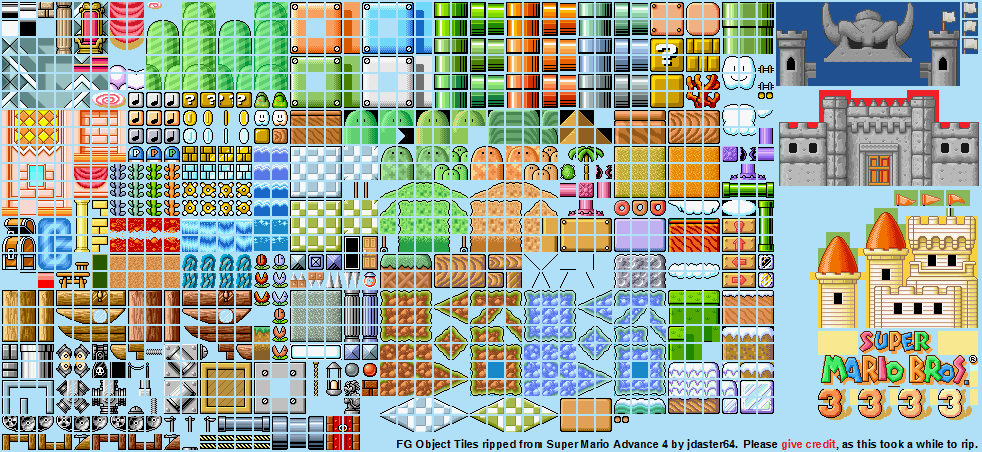
Today I downloaded some mario tile art for the graphics of my game which can be found HERE. I started to figure out how to use a photo with multiple tiles on it, and use only one tile in that photo. To do that I just imported that photo to game maker and created a background. I then loaded it into game maker and set the tile properties to: tile width: 16, height: 16, horizontal offset: 2, vertical offset: 2, horizontal sep: 2, and vertical sep: 2. Then I selected a tile I wanted to use and held down shift and drew the ground. Below is a photo of the game so far, besides the mechanics and controls behind it.

Tuesday, 15 April 2014

DAY 8

Today I created a very simple maze type of game, and I have all of the basics of Game Maker down. So I started making a platformer game and followed along this video HERE. It shows how to make a simple platformer which is exactly what I am looking to do. All I have to do to make the movements of the character, is add an event to the object connected to the character (which I figured out how to do), then click keyboard, then click the arrow direction, and add a speed to it. In order to do this, I had to create a sprite and connect it to an object.

Monday, 14 April 2014

DAY 7

Today I found another youtube tutorial on making a flappy bird type game, and it definitely wasn't as helpful as the last video because it didn't have anyone talking or anything. Though the last video was also a bit confusing because it showed to add an action to the sprite of the bird, but when I went to add it, there was no button to add an action. I think I might just start off doing a simpler type of game such as a pixel platformer or something like that. Here is the link to that video: CLICK HERE

Thursday, 10 April 2014

DAY 6

Today I was searching up a few different video tutorials on Game Maker Studio, and came across a video on how to make a flappy bird type of game. I decided that this will probably be the easiest type of game to do, and It would be kind of cool since the original flappy bird got so much success. Here is the link to that video I was watching: CLICK HERE

Wednesday, 9 April 2014

DAY 5

Well today I watched a few different tutorial videos to get a different perspective on it and learned that it is alot easier to sort the objects, backgrounds, etc. with names to not get anything mixed up. I also added minor details to the game.

Tuesday, 8 April 2014

DAY 4

Today I continued watching and following along the Game Maker Studio tutorial video. There is not much more to say other than that.

Monday, 7 April 2014

DAY 3

Today I continued watching the tutorial video for Game Maker Studio. I started to follow along with the video and create a simple platformer. I've only got the basics down such as the background, and the first room (level). I hope to spend quite some time on this game and make it look quite good.

Friday, 4 April 2014

DAY 2

Today I started watching youtube videos on beginning tutorials for Game Maker Studio. I am planning to maybe start on making a platformer game to start out with because i'm thinking that it will probably be the easiest to make. There was one video in particular that was quite helpful and taught me the four main things to create a game: Rooms, Backgrounds, Sprites, and Objects. The link to that video is HERE.

Thursday, 3 April 2014

MONTH 3: DAY 1

Today and yesterday the whole both classes I spent trying to upload the high resolution video to youtube, but it got to about 70% done before the class ended. I don't know how I will be able to actually upload it so I will most likely just transfer it using a USB. The next thing I decided to do Is Game Maker Studio, which I was going to do from the start originally.

Monday, 31 March 2014

DAY 9

Today I found out that I have to fix the video as it didn't render with the intro I made and It also wasn't even close the the resolution I wanted. The whole class I took to render it out with the correct resolution and intro. I also figured out that I wanted to do Android App development for the next Independent thing.

Thursday, 13 March 2014

DAY 8

Today I started uploading the hairshow video privately on youtube so noone could see it, and it was at the resolution of 360p which is really bad. I might just take tomorrow to find a way to upload it in hd.  I also researched on what I should do next in this class and I was thinking about doing Java language coding, but it seemed too complicated for me. I am considering doing App Developer for android.

Wednesday, 12 March 2014

DAY 7

Today I started to google some ways to export videos and files from Adobe Premiere Pro CC to try and upload it to youtube. I found some ways to export faster such as this one HERE. All I had to do was change some settings. After it gets ready to export, It opens up Adobe Encoder (It only does that if I pressed: add to render queue). While I was waiting for it to finish exporting, my computer for some reason froze. I think it was because Adobe Encoder was taking up a lot of the computer's resources. So I re-exported it and realized I didn't have enough time to upload the video to Youtube or anything.

Tuesday, 11 March 2014

DAY 6

Today I focused on finishing up the introduction title and Hairshow video all together. Once I exported the intro out of after effects, I imported it into Premiere and added it to the beginning of the video. I lined up all the clips and went to export it, when It said was going to take 2 hours. Usually it doesn't actually amount the the estimate, so I waited for it to export. After waiting most of the class, it turns out the estimated time was the real time, so I have to figure out how to export it faster.

Monday, 10 March 2014

DAY 5

Today I continued on what was left to do on the introduction title. I adjusted and customized a few things from the pre-made, downloaded intro. At the beginning of the intro, It shows a logo and says "Put logo here" so I searched up the ACSS totems logo and downloaded it from google images. I dragged the logo into After Effects, and tried to put it on the "Put logo here" layer. It turns out if I drag it into the timeline, it just creates it's own layer, so I don't know how else to do it. I decided that I am just going to cut the "Put logo here" out of the intro and keep the rest. So next class I can just add the intro to the video, and finally be done with it.

Friday, 7 March 2014

DAY 4

Today I continued searching throughout the many videos of youtube, and finally found a template that ACTUALLY works. I still haven't figured out why they didn't work before. This one is kinda cool, and has 3D particles in it which makes it a lot cooler. I went to the text layer and clicked on the text. To change the text, just click on where it is, and it'll allow you to change it to whatever you want it to. Then it takes a really long time to render, and I couldn't do much in the background due to the lag the rendering was producing.

Thursday, 6 March 2014

DAY 3

Today I did a few touch ups on the hairshow video. I continued to search for Intro videos on Youtube. I found tons of intro videos that were really cool and had 3D particles and things like that. Though they weren't exactly suitable for the Hairshow video so I continue to search. I downloaded a few of the intros and most of them didn't actually work. It just showed a bunch of different colours instead of the actual intro. Though I managed to fix some of them but It only showed the text, not the 3D particles. I fixed it by deleting the layer that had the colours, and keeping the text. I didn't end up actually finding a suitable intro.

Wednesday, 5 March 2014

DAY 2

Today I watched a bunch of Youtube videos on how to create a really cool introduction title in after effects. I found quite a few videos that were interesting. I decided to also search up intro templates, which are pretty much pre-made introduction title. I found a few that were pretty cool and downloaded them. I tested them and haven't actually decided on an intro.

Tuesday, 4 March 2014

MONTH 2 - DAY 1

Today I started on the introduction title for the beginning of the Hairshow video. I started by searching google for a cool way to make a good intro in After Effects CSS. It was easier to follow a video on youtube so I went to youtube instead. I found and watched a few videos, and this one was the coolest and best: (CLICK HERE) It was a bit complicated but I watched through it slowly enough to understand it. Since I was watching through it slowly and had to repeat a few parts, I only got through 4 minutes. I learned how to create a 3D scene so far.

Friday, 28 February 2014

DAY 13

Today I finally finished up the Hairshow video after having to restart it over 3 times. I added the rest of the transitions to the remaining photos and decided that I wanted to have a really cool intro title of some sort. So I googled it and watched a few videos, and the only one that was helpful in the way I was wanting to do the intro was this video: Click Here. This tutorial shows how to make a simple 3D intro but doesn't look as well as I want it to. I think I will end up using After Effects for the intro as it has a lot more features and there is quite a bit  more tutorials on it than Adobe Premiere has.

Thursday, 27 February 2014

DAY 12

Today I added some more transitions to the rest of the pictures. I had to make the song a bit longer because there were too many photos to fit the song perfectly, so I made the same verse play twice and made it sound like the actual song so it didn't sound edited. I also added a clapping sound effect at the end of the video to take up the leftover room in which the audio didn't cover over the video. I noticed some doubles of pictures too and deleted them.

Wednesday, 26 February 2014

DAY 11

Today I decided to use the song Wake Me Up - By Avicii for the video. I got this song off of youtube and used an mp3 downloader to download It. Here is the mp3 downloaded that I used: http://www.youtube-mp3.org/. To use it you have to copy the link of the youtube video URL, and paste it into the website. Wait for it to convert and click the download button and it will download to an mp3 file which I can drag from the downloads folder into the timeline of Adobe Premiere. There are different layers so it didn't work when I tried to drag the music file into a video layer. I had to make sure to drag it to the audio layer which is labeled A1,A2 or A3. I also added transitions in between each photo to make it more interesting. I added transitions through about 3/4th of the photos and didn't have time to finish.

Tuesday, 25 February 2014

DAY 10

Today I searched for a song that would be around the length of the video which is about 5 minutes. Alot of songs are usually around 3 minutes so It was really hard to actually find a song that was less than 5 minutes and would be suitable for girls also. Im not sure if im going to use it but the song I am using so far is Wake me up by Avicii. I also deleted a few double of the photos so it made the video a bit shorter as well.

Wednesday, 19 February 2014

DAY 9

Today I used this video (CLICK HERE) in order to help me figure out different things with Adobe Premiere and make it easier to make the slideshow. I learned that I can stretch the audio of the song to match the length of the video, but if  I make it too long it distorts it and makes it sounds really bad. I also looked at the speed/duration (side click on the clip) of the song to see exactly how many frames it is, divided that by how many photos I have, created a new project, and went to Edit>preferences>general and set the amount of frames I got from the division, into the default frame duration. I made the frames a little bit more than I should have, and the song is a bit short for the actual video now so I had to find a new song.

Tuesday, 18 February 2014

DAY 8

Today I started looking up music for the video which was at the most 3 minutes long, because the pictures were all added up to 3 minutes. To increase the frames the pictures showed up for, I went into Edit>preferences>general>and and adjusted the still image default duration to 30 frames instead of 120 which it was at before. That changed the video length from 15 minutes to 3 minutes. I also started to add some transition effects in between each photo. To do that I went into the effects tab>Video Transitions> and dragged the transition I wanted in between the two photos. I am going to try and mix up the transitions so they aren't the same every photo.

Monday, 17 February 2014

DAY 7

Today I worked on the Hairshow video, and it took some time but i finally figured out how to actually increase the speed in which the photos are shown for, and they each go for about 3 seconds and then continue to the next one. In the background I installed Adobe After Effects.

Friday, 14 February 2014

DAY 6

Today I got the video files from a USB and imported them into Adobe Premiere. I need to edit a bunch of photos from the Hair-show and make it into a slideshow. I then started to put the clips together and realized that the duration was 5 seconds for each photo and there was about 150 photos, so overall the video was 15 minutes long, which was way too long. So I then searched on Google to find out a way to change the duration and figured out that I needed to go into preferences>general>and change the duration from there. I haven't figured out the music Im going to put on the video yet.

Thursday, 13 February 2014

DAY 5

Today I connected my laptop to a wired internet connection, and realized it was a lot faster than using wireless. Basically the whole class I waited for Adobe Premiere to download, extract, and install, now that I am changing from Game Maker Studio, to Adobe Premiere and After Effects CC. Tomorrow I will probably work on Premiere while After Effects downloads in the background.

DAY 4

I am writing this on day 5 as I was sick on day 4 and couldn't come to school.

Tuesday, 11 February 2014

DAY 3

Today I continued on the creation of my Game Maker game. I finished off on the coding part, and continued on to the actual visual part, which is a lot easier. I started on creating a basic plat-former setup, and decided to switch from Game Maker Studio, to Adobe Premiere and After Effects. I began downloading Adobe Creative Collection (The upgrade from CS6), and while i was in the middle of doing that, my computer crashed. So I restarted my computer and did the download again, but I couldn't finish the download in time for the bell.

Friday, 7 February 2014

DAY 2

Today was a lot more eventful then yesterday, as I learned some basic physics coding in Game Maker. I made a plat-former with those skills, but haven't yet created a game. I also connected a second monitor to the laptop I use. I use it to watch a tutorial on one screen, and do my work on the other. This makes work a lot more efficient.

Thursday, 6 February 2014

DAY 1

I just joined the class today, created this blog, and downloaded Game Maker Studio. I think I've decided on doing GameMaker.  I messed around with it a little bit too, Didn't really do too much.